
Who Lite - Video chat now
Media Republic AppsSocial
4.5636.00 Reviews
- Version
- 1.0.164
- Installs
- 10.00M
- Age Rating
- Mature 17+
Screenshots

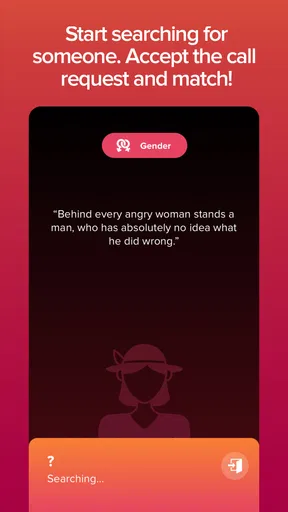
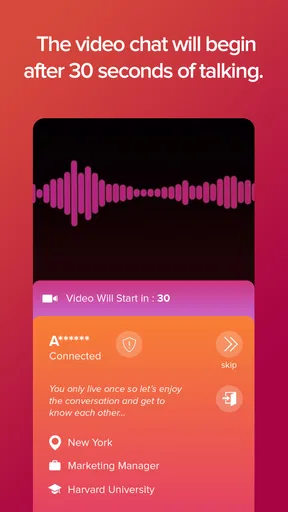
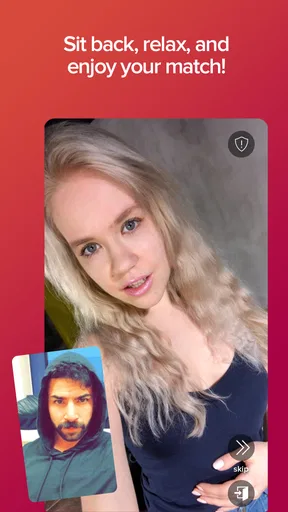
Our Review of Who Lite - Video chat now
 Analysis by Appyee
I approached Who Lite - Video chat now as a social app for people who want live conversation rather than a carefully edited profile feed. Its basic appeal is easy to understand: open the app, meet people through chat, and decide quickly whether a conversation feels natural. That makes it a different kind of choice from messaging services built around people you already know or social networks where interaction is mostly public and asynchronous.
My overall impression is that Who Lite is most interesting when I treat it as a lightweight way to discover conversations, not as a replacement for every social platform on my phone. The experience is immediate, but that immediacy also means I have to be more selective about who I engage with, how much personal information I share, and whether I am comfortable with the mature audience it is designed for.
How I would decide whether Who Lite fits me
I would use this section to make the choice practical: am I looking for spontaneous conversation with new people, or dependable contact with people I already know? I’d also weigh my comfort with live interaction and my willingness to set firm privacy and spending boundaries before I start.
The right question is what kind of social contact you want
Before installing it, I would ask myself whether I want spontaneous interaction with new people or a dependable way to keep up with friends. Who Lite belongs firmly in the first group. It is a free social app from Media Republic Apps, with a mature seventeen-plus content rating, and its focus is live chat and meeting people. That combination makes it better suited to adults who enjoy open-ended conversations than to anyone looking for a private family messenger, a work communication tool, or a quiet community organized around a specific hobby.
I also would not judge it by the same standard as a conventional social network. A traditional network gives me time to browse posts, inspect a profile, and decide what to say. A live-chat app places more weight on the first interaction. If I dislike that pressure, the format may feel tiring even when the app itself is working as intended. On the other hand, if I find text-based social feeds repetitive and prefer a more direct exchange, the live format can feel refreshingly simple.
What I look for during the first session
My first decision criterion is whether the app lets me understand its social rhythm quickly. I want to know whether conversations feel casual, whether moving from one interaction to another is straightforward, and whether I can leave an uncomfortable exchange without feeling trapped. In an app centered on meeting strangers, those details matter more to me than decorative interface elements.
The second criterion is control. I would pay attention to how easy it is to manage who gets my attention, how carefully I can choose what to reveal, and whether I can keep the experience within boundaries that suit me. I would start with a neutral profile, avoid sharing a phone number or exact location, and keep the first conversations general. That is not a criticism unique to Who Lite; it is simply the sensible way to use any service built around contact with unfamiliar people.
The third criterion is whether the free starting point is enough for the way I plan to use it. Who Lite is free to install and use as an entry point, but it includes in-app purchases ranging from $0.99 to $239.99 per item. I would therefore treat optional spending as something to inspect carefully rather than assuming every useful interaction will remain cost-free. Anyone uncomfortable with virtual purchases should set a device spending limit before experimenting.
A realistic everyday use case
Imagine I have finished work, have a short break before dinner, and want a conversation that is not connected to my usual circle. I could open Who Lite, spend a few minutes seeing whether a live exchange feels comfortable, and leave when I have had enough. That is a more suitable use case than opening it while I am rushing between appointments or trying to multitask. Live conversation needs attention, and a distracted user is more likely to miss warning signs or make a careless choice about personal details.
I would also use a gradual approach. Instead of trying to turn the first interesting chat into an ongoing relationship immediately, I would keep the initial exchange light, see whether the other person respects boundaries, and only then decide whether continuing makes sense. This small habit improves the experience because it prevents the novelty of meeting someone new from becoming pressure to disclose too much too soon.
Where Who Lite works best
I’d get the most from Who Lite when I have a little uninterrupted time and feel open to a casual conversation, rather than when I’m rushing or hoping to solve loneliness in one session. This section looks at how short, attentive visits can make the experience easier to judge while keeping control of what I share.
It reduces the distance between discovering someone and talking
The strongest part of the concept is the short path from curiosity to conversation. Many social apps make me perform a lot of preparation: build a profile, follow accounts, wait for a response, and interpret public reactions. Who Lite is aimed at a more direct moment. The attraction is not a large archive of content; it is the possibility of a live exchange with someone I did not already know.
That can be valuable for users who are bored with passive scrolling. I may not want to publish a polished update or compete for attention in a public feed. I may simply want to say hello, exchange a few thoughts, and move on. In that situation, the app's social format feels more purposeful than endlessly refreshing a timeline.
It is approachable for short, low-commitment sessions
I like the idea of using it in small windows rather than treating it as a full-time social home. A brief session can be enough to discover whether the environment suits me. I do not have to reorganize my existing contacts or persuade friends to join before I can understand the appeal. That makes the initial commitment relatively low in terms of time and social obligation, even though I still need to be cautious about optional purchases.
This short-session quality is also useful for people who are comfortable starting conversations but do not want the maintenance work associated with a large profile-based network. There is a difference between wanting social contact and wanting to manage a public identity. Who Lite is more appealing when I want the former without making the latter the central activity.
The mature audience changes how I use it
The seventeen-plus rating is not a minor label I would ignore. It sets a clear expectation that this is not an app for children or young teens, and it should influence how families think about access. For an adult user, the rating signals that conversations may be more suitable for mature audiences than for general-purpose social spaces.
Even as an adult, I would still keep the same basic safeguards: avoid moving quickly to private contact channels, do not send sensitive images, and leave conversations that become manipulative, aggressive, or sexually inappropriate. A mature rating does not guarantee that every person I meet will share my expectations. It only tells me that the app is intended for an older audience.
Small habits make the experience more manageable
One useful workflow is to decide my boundaries before opening the app. I might choose a session length, decide which topics are off-limits, and make a rule that I will not spend money during the first few visits. This keeps the experience experimental instead of letting curiosity turn into impulsive purchases or unwanted commitments.
Another practical habit is to judge consistency rather than charm. Someone can be entertaining in an opening exchange, but the more revealing test is whether they accept a simple “no,” respect a change of subject, and avoid pushing for personal information. That is a non-obvious but important way to evaluate live-chat interactions, because speed can make a friendly first impression feel more meaningful than it really is.
Why the public numbers are encouraging, but not decisive
Who Lite has an average rating of 4.5 from around 35 thousand ratings, and it has passed 10 million installs. Those figures suggest that the concept has found a substantial audience and that many users have been satisfied enough to rate it positively. They are useful signs when deciding whether the app is worth trying, but they do not tell me whether a stranger-focused live-chat format matches my personality.
The app was released on June 1, 2020, and the current version is 1.0.164. It supports devices running Android 8.0 or later. For me, the practical takeaway is to check my device compatibility before planning around it, especially if I use an older phone. The developer is Media Republic Apps, so that is the name I would look for when identifying the correct app rather than relying only on a similar-looking icon or title.
Where the experience can become frustrating
The same immediacy that makes the app attractive can make it inconsistent. A conversation may be engaging one moment and uninteresting the next, and I cannot assume that every person I meet is looking for the same kind of interaction. Users who prefer predictable communities, detailed moderation expectations, or topic-based discussion may find a specialized forum more satisfying.
There is also a social-energy cost. Starting over with unfamiliar people repeatedly can be more tiring than replying to friends or following a familiar group. If I am using the app because I feel lonely, an awkward interaction may feel more disappointing than it would during casual entertainment. I would keep that emotional factor in mind and avoid treating the app as a guaranteed solution to isolation.
Privacy and personal boundaries are part of the product experience
When an app is built around meeting people, privacy is not something I consider only after installation. I would use a nickname if the app allows one, keep identifying details general, and avoid discussing my home, workplace, daily route, or financial situation. I would also be careful about moving a conversation elsewhere, because another platform may reveal more information than I intended.
My strongest advice is to slow down when someone creates urgency. Pressure to share a private image, send money, reveal a location, or continue a conversation after I have said no is a reason to stop engaging. The most enjoyable live-chat experience is not the one that produces the fastest connection; it is the one where I remain comfortable and in control.
How it compares with familiar alternatives
Compared with a messaging app such as the one I use with existing contacts, Who Lite offers discovery instead of certainty. A messenger is better when I already know who I want to reach and need reliable, ongoing communication. Who Lite is more relevant when the point is to meet someone new, but that also brings more uncertainty and requires stronger personal judgment.
Compared with a public social network, it feels less centered on publishing content for a broad audience. A public network is usually better for following creators, reading updates, and maintaining a visible identity over time. Who Lite makes more sense when I value direct interaction over building a public feed, although users who enjoy carefully curated profiles may prefer the slower pace of a conventional network.
Compared with interest-based communities, it gives up some subject focus in exchange for immediacy. A hobby forum or group chat can make conversation easier because everyone starts with a shared topic. Who Lite may be more spontaneous, but I may need to do more work to discover whether a conversation has substance. That trade-off is central: choose it for open-ended contact, not for guaranteed expertise or a built-in shared interest.
What switching to it really costs
The cost of switching is not just storage space or installation time. It is the attention required to learn a new social rhythm and the effort of deciding which conversations deserve continuation. If I already have a satisfying routine with friends, a community server, or a topic-focused platform, Who Lite may add novelty without solving an actual problem.
There is also a financial decision. Because individual in-app purchases can reach $239.99, I would not explore the app casually with unrestricted payment access. I would first understand what is available without buying anything, then decide whether a paid item delivers a clear benefit for my own use. If I cannot explain exactly why I want a purchase, I would skip it.
On the positive side, trying it does not require abandoning other social apps. I can use it as a separate experiment, keep my existing contacts elsewhere, and stop if the conversations do not justify the time. That makes the app easier to evaluate than a service that demands a complete migration of messages, followers, or personal archives.
Who should install it, and who should pass
I would recommend trying Who Lite to an adult who enjoys meeting unfamiliar people, is comfortable with live conversation, and can maintain firm privacy boundaries. It is especially suitable for someone who wants a direct alternative to passive scrolling and does not need every interaction to develop into a long-term connection.
I would suggest skipping it if I were looking for a child-friendly social space, a professional networking tool, a private messenger for known contacts, or a tightly moderated community about one subject. I would also pass if spontaneous conversations make me anxious or if I tend to spend impulsively when an app presents paid options. In those cases, a familiar messaging service or a focused community is likely to be a better match.
My recommendation after weighing the trade-offs
My recommendation is cautious but positive: Who Lite is worth trying as a free social experiment, provided I approach it as live discovery rather than as a promise of instant friendship. Its appeal comes from making new conversations feel close at hand, and its large install base and strong average rating indicate that the idea resonates with many people. Still, popularity cannot remove the need for judgment when interactions begin with strangers.
I would install it on a compatible Android device, spend time learning the free experience, and keep purchases disabled until I understood exactly what I was paying for. I would also use short sessions, share very little personal information, and leave quickly when a conversation crossed my boundaries. The best reason to choose Who Lite is the desire for spontaneous adult conversation; the best reason to choose something else is the need for predictability, privacy, or a shared topic from the start.
In the end, I see it as a focused social option rather than an all-purpose replacement for messaging and community apps. For the right user, that focus is the point. For everyone else, the alternatives may offer a calmer and more familiar way to connect. If I remember that distinction before installing, I can decide fairly whether the app adds something useful to my routine.
Verdict
Strengths of Who Lite - Video chat now
- Lightweight app that uses less storage than many video chat platforms.
- Simple interface makes starting a video call quick and easy.
- Works well for casual one-to-one conversations with minimal setup.
- Useful for users with older phones or limited device resources.
- Video calling can be a convenient way to stay connected on the go.
Limitations of Who Lite - Video chat now
- Call quality may vary significantly with weak or unstable connections.
- Limited features compared with full versions of popular chat platforms.
- Privacy details should be checked carefully before sharing personal information.
- A smaller user base may make it harder to find contacts on the service.
- Battery usage can increase during longer video calls.
Other Releases by Media Republic Apps
View All
Who - Live Video Chat
Social4.5
Similar Picks in This Category
View All
Meta Platforms, Inc.4.6

Instagram4.0

Likee-Live, Chat & Party Games
Likeme Pte. Ltd.4.4

Facebook Lite
Meta Platforms, Inc.4.5

TikTok - Videos, Shop & LIVE
TikTok Pte. Ltd.4.0

Moj: Free Short Drama & Reels
ShareChat4.1
Frequently Asked Questions
What is Who Lite - Video chat now, and what can I use it for?
Who Lite - Video chat now is a social communication app designed for meeting people and starting conversations through video chat. After creating a profile, users can browse available contacts, connect with new people, and use video or text-based interactions depending on the features offered in their region. It is mainly intended for casual social discovery rather than professional meetings or private messaging with existing contacts.
Is Who Lite - Video chat now free to download and use?
The app can generally be downloaded without an upfront charge, but some functions may be limited or supported by in-app purchases, virtual credits, subscriptions, or advertising. Features such as extended video calls, additional matching options, profile visibility, or special interactions may require payment. Before confirming any purchase, check the app’s current pricing, renewal terms, and cancellation instructions on the Google Play Store or Apple App Store.
Is Who Lite - Video chat now safe and suitable for teenagers?
Because the app connects users with people they may not know, safety depends on both the platform’s moderation tools and your own online habits. Review the listed age rating before installing, and do not assume every profile is genuine. Avoid sharing your address, school, workplace, financial information, passwords, or private photographs. Never send money to another user, and report or block suspicious, abusive, or inappropriate behavior immediately.
Does Who Lite - Video chat now require a camera, microphone, or personal information?
Video chat normally requires access to your device’s camera and microphone, while account creation may request information such as a nickname, age, profile photo, location, or login details. You can review and change permissions through your Android or iOS settings. Only grant access that is necessary for the features you intend to use, and read the privacy policy to understand how profile data, messages, recordings, and activity information may be handled.
What should I do if video chat is not working or the app feels slow?
Video calling performance is strongly affected by your internet connection, device permissions, camera access, and the app’s current server status. Try switching between Wi-Fi and mobile data, closing other apps, restarting Who Lite, and checking that the camera and microphone permissions are enabled. Updating the app may also help. If problems continue, use the in-app support option and include your device model, operating-system version, and a description of the error.
